this apps has two text field for first and second number and one button that adds the two number and one text below the text shows the result, so variable for below text is _result, make the ui according to context, make a method that parse string to int or double and store into variable and their addition in a _result variable and wrap it with setState() method so it rebuild the ui. that’s it.
Increment and Decrements app in Flutter
this app shows a counter and two floating button at bottom right, this two button increment, decrements the counter and a text in a center of screen that shows the counter information so let’s start it this tutorial is all about main information. first create the basic ui.
the counter information is store in _counter variable and make two methods increment and decrements that _counter– and _counter++ wrap this counter in a setState() method so it update the state and rebuild the ui, use this two methods in a floating button that’s it, it very short tutorial for increment and decrements it is local state or view changes state.
Stateless vs Stateful Widget
What is State?
a state is a information display on ui screen, example a text counter in a center of screen in flutter starting app, the count text is shows the information about counter.
Stateless widget?
a stateless widget is a ui which once initialized and never be changed, stateless class have build method to display which information to be drawn, it is very useful for displaying static contents.
Stateful widget?
a stateful widget is same as stateless widget, a stateful widget have two classes a state class is responsible for update the ui changes, a count text that shows information about counter can be changed in state class using setState() method, this method is rebuild the ui. basically a state class have life cycle methods for drawing, updating, and disposing the state.
What is flutter?
Flutter is cross platform development framework designed to mobile apps for android, ios, you can use flutter for developing web and desktop applications also. flutter is developed by google, flutter is a framework uses a dart language which is similar to the java language, dart also developed by google. Flutter is easy to learn and implement.
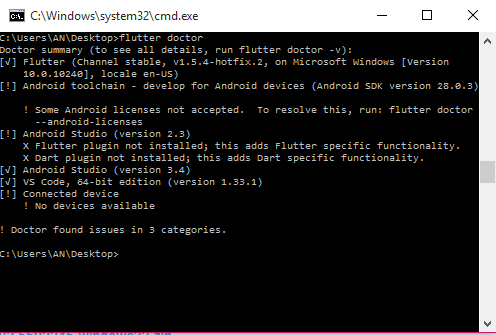
download the sdk from official site and extract and set the path of flutter/bin after setting path type command flutter create my_app make sure you connected to the internet, flutter need some dependency while creating an app, if everything is fine you see a folder my_app, you want to check everything is properly installed or not use flutter doctor command for building the android apps you need to install android studio or android sdk, you can write code in any editor or you can use vscode or android studio
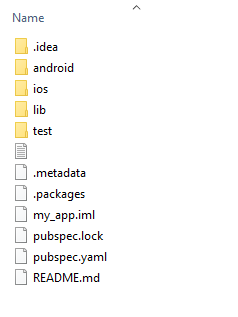
The folder my_app contains some files and folders in which lib folder contains the all the dart codes you use in your apps the main.dart is a starting file, it contains the demo app by flutter which is a increment the counter when you pressed the button, to run the app first connect the device and run or type flutter run command, first time it takes some time make sure you connected to internet.
the main.dart file contains main function the main() is a starting point, in which runApp() is used to run and structure your app it takes widgets